Open editor
Open source · No install · No upload

Edit Word documents online, without uploading them

WordCraft is an open-source word processor written in Rust, running here in a browser tab. It has the ribbon, styles, tables, track changes and references you know from Word, and it opens and saves .docx files. Your documents never leave your computer.

WordCraft web build v0.5.0 · released Oct 11, 2026 · loads once, then opens from cache

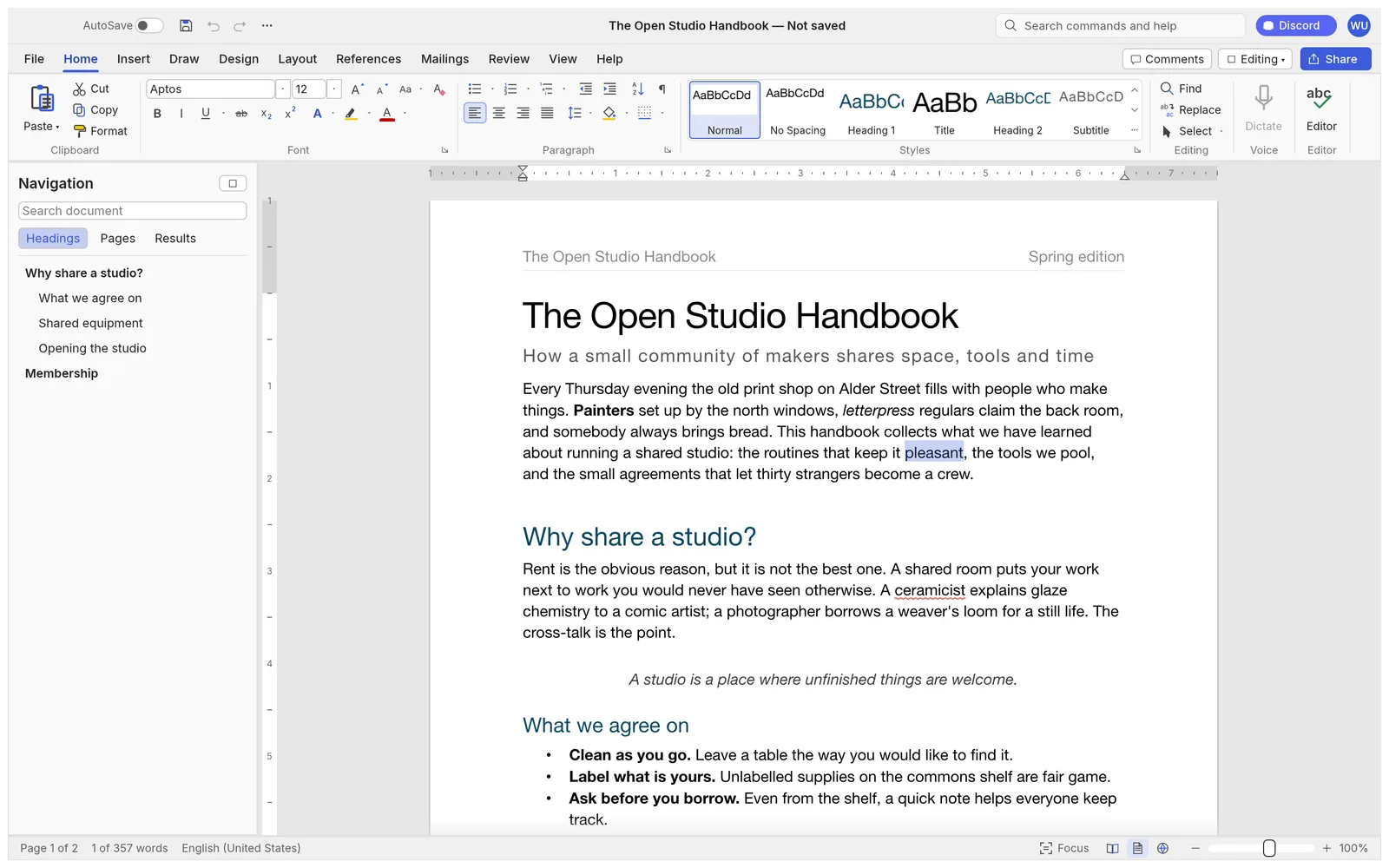
WordCraft with the Home tab of the ribbon open over a document titled The Open Studio Handbook, the Navigation pane listing its headings and the Styles gallery showing Normal, Heading 1, Title and Subtitle
The Home tab, the live Styles gallery and the Navigation pane, on WordCraft’s built-in sample. Screenshot from the WordCraft project.
Opens and saves .docxPlus .odt, .rtf, .html, .md, .tex and .txt; opens .doc
422 commandsThe same ones behind the ribbon, shortcuts and command search
PDF exportWith selectable text, links and bookmarks
Private by designEvery document stays on your device
In the editor

The Word workflow you know, in a browser tab

WordCraft follows Word’s ribbon tabs, groups and shortcuts: Enter continues a list, Tab demotes it, Ctrl/⌘+B bolds the word under the caret, F4 repeats, F7 checks spelling. Search for any command by name in the box at the top.

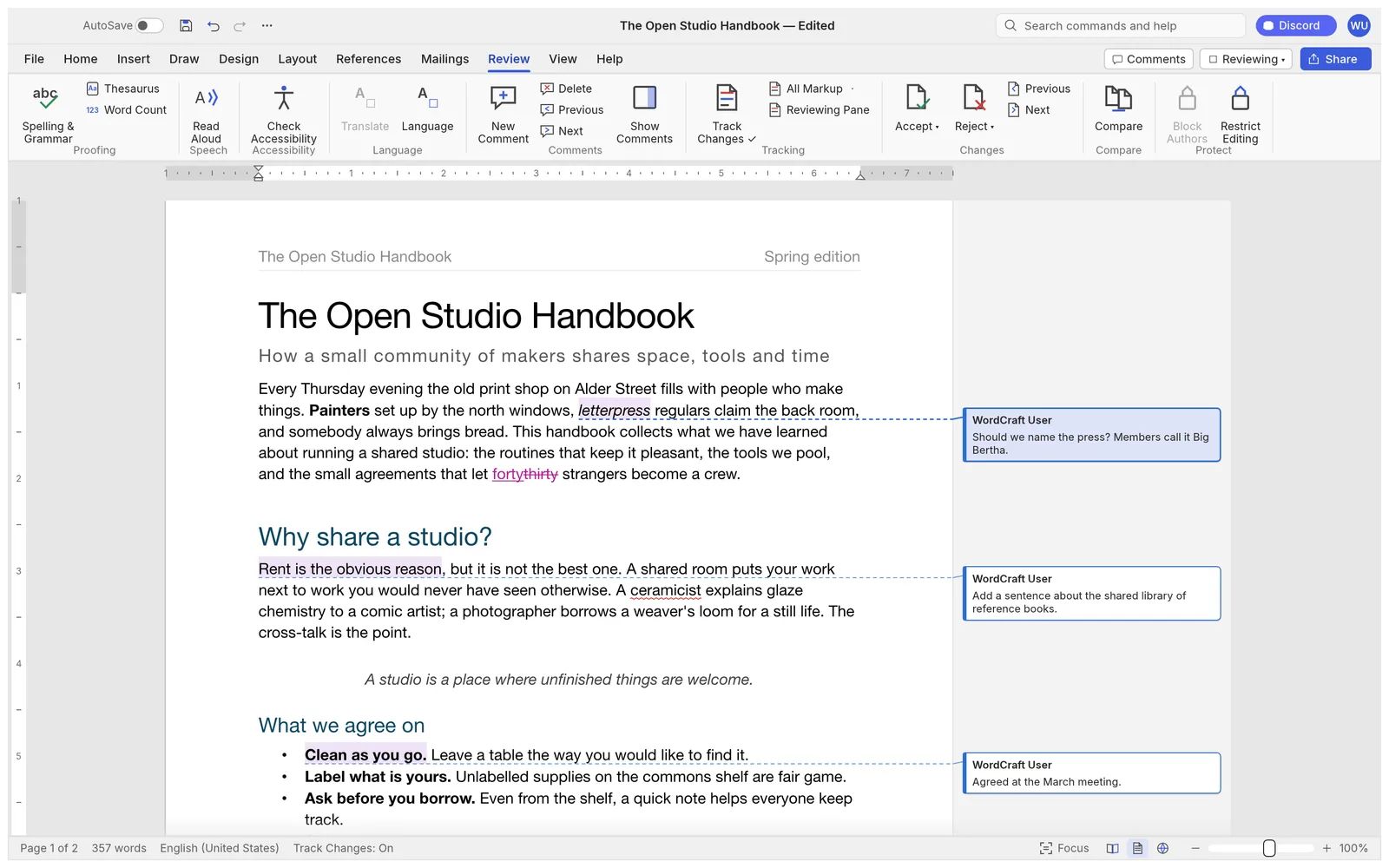
The Review tab with Track Changes on: an inserted word in magenta, a deleted word struck through, and three comments in balloons in the margin

Track changes and comments

Turn on Track Changes and every insertion and deletion is marked with its author; accept or reject them one by one or all at once. Comments sit in balloons in the margin or in a pane. Spelling and simple grammar are checked as you type, offline.

Screenshot from the WordCraft project
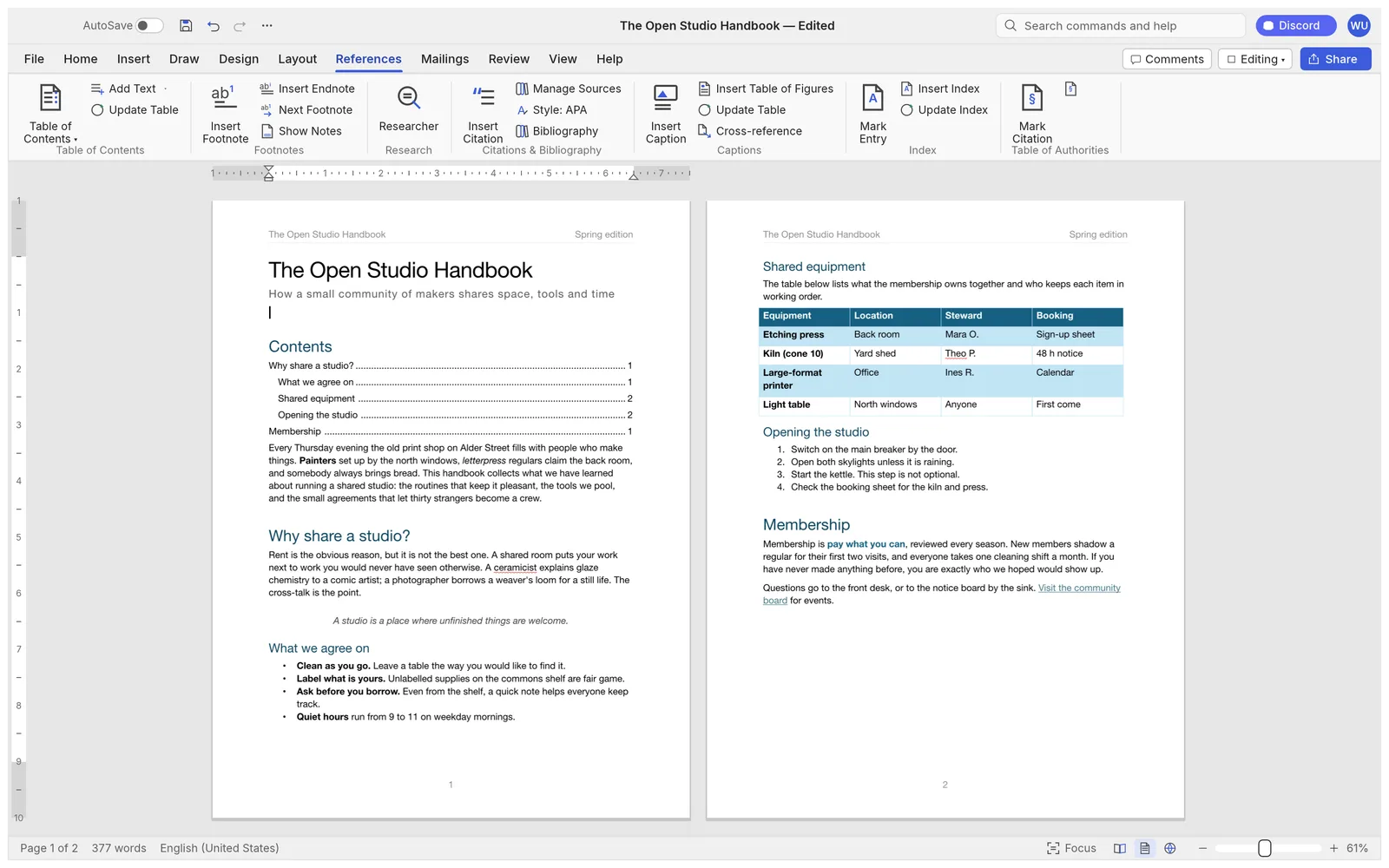
The References tab with two pages side by side: a table of contents with dotted leaders and page numbers, and a styled table, a numbered list and a hyperlink

References for long documents

A table of contents built from your headings, footnotes and endnotes, citations and a bibliography in APA, MLA, Chicago or IEEE style, captions, a table of figures, cross-references and an index.

Screenshot from the WordCraft project
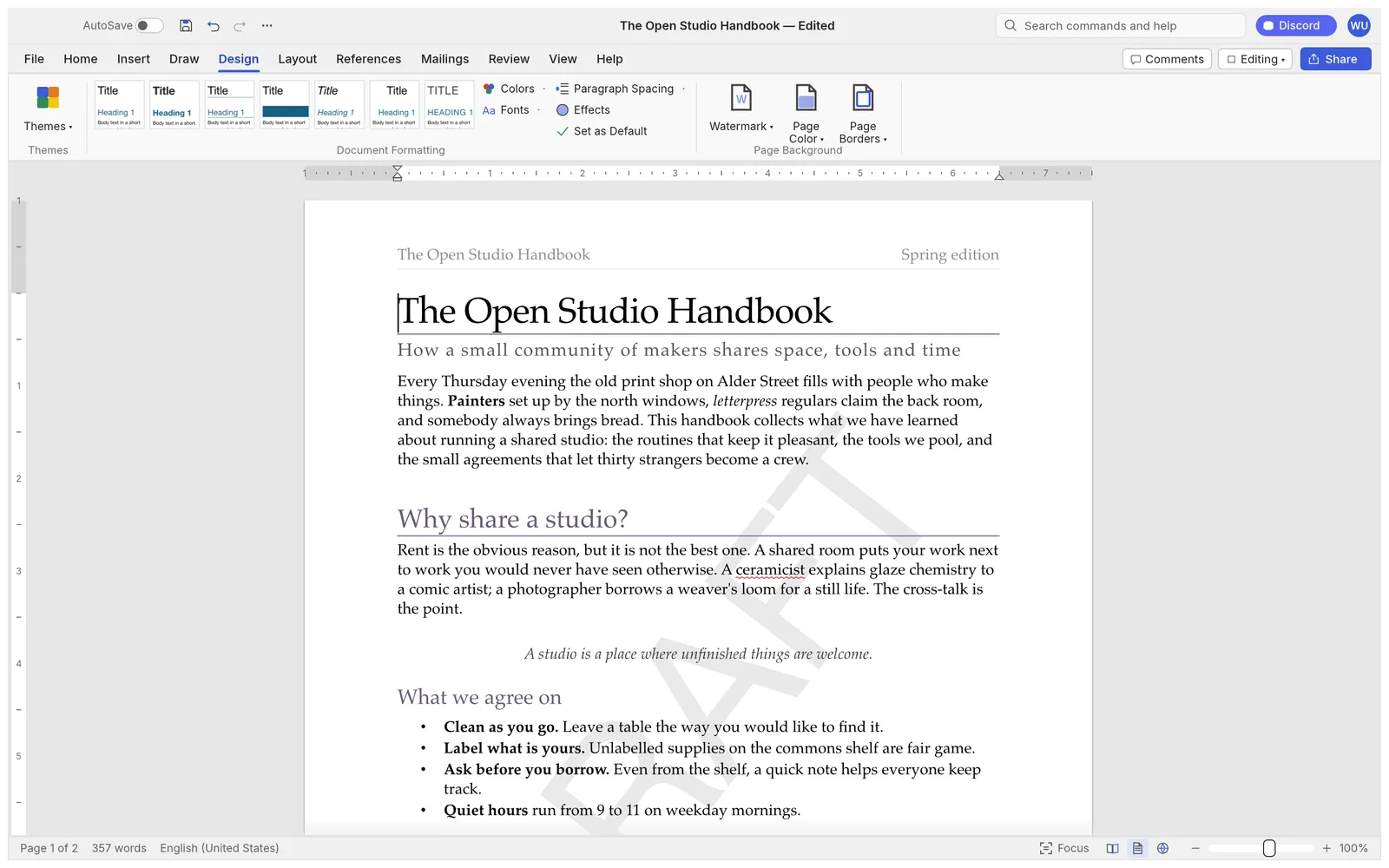
The Design tab with style-set previews; the document uses a serif theme with plum headings and a pale diagonal DRAFT watermark

Styles, themes and watermarks

The Styles gallery previews each style live as you point at it. Change the whole look with a theme or style set, set paragraph spacing, or add a watermark, page colour and page borders from the Design tab.

Screenshot from the WordCraft project
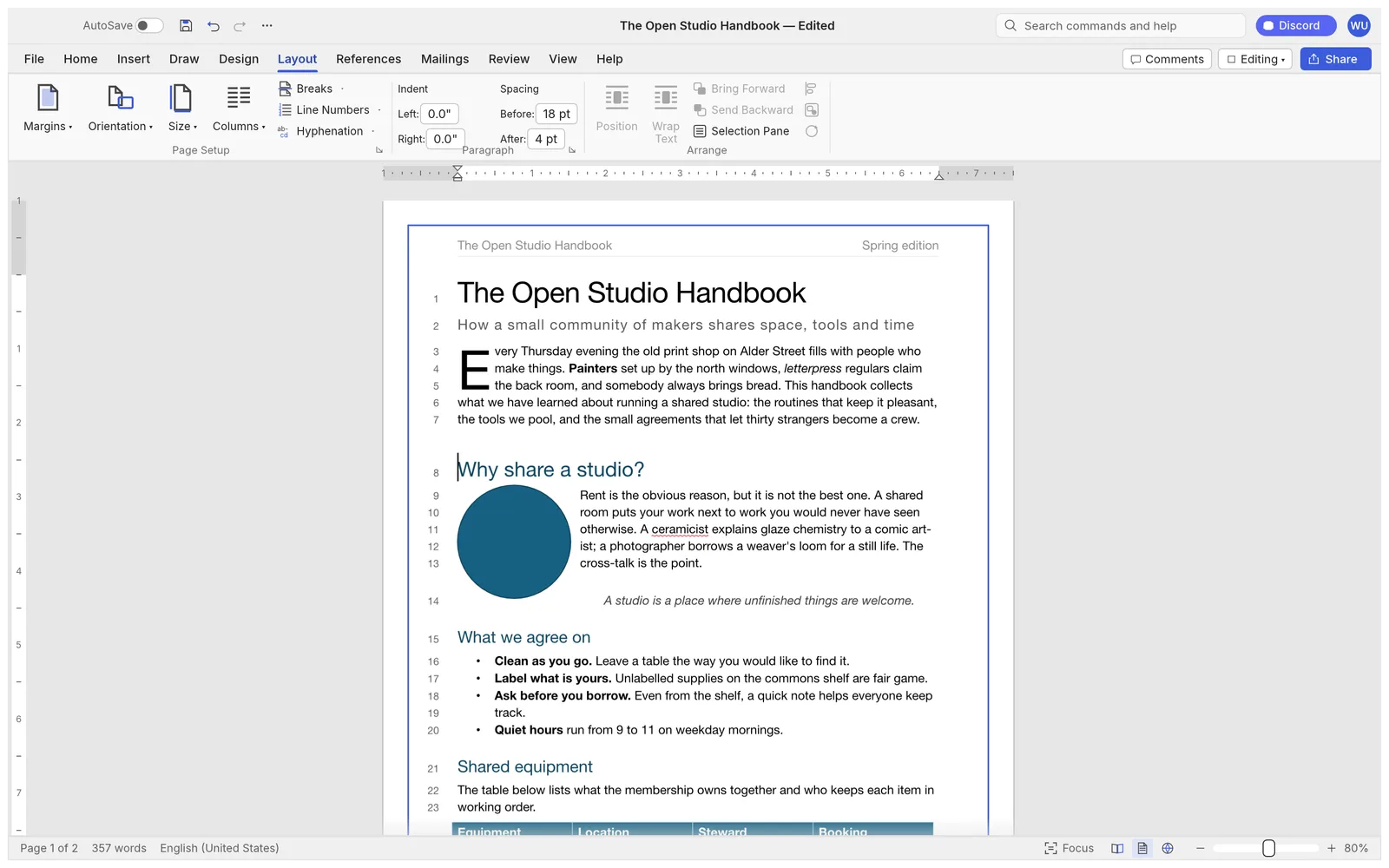
The Layout tab at 80% zoom: a three-line drop cap, a circle with text wrapping around it, a hyphenated line end, line numbers in the margin and a page border

Page layout that behaves like Word

Margins, orientation, columns, section breaks, headers and footers, page numbers, drop caps, automatic hyphenation and line numbers. Pictures and shapes float with square, top-and-bottom, behind-text or in-front-of-text wrapping.

Screenshot from the WordCraft project
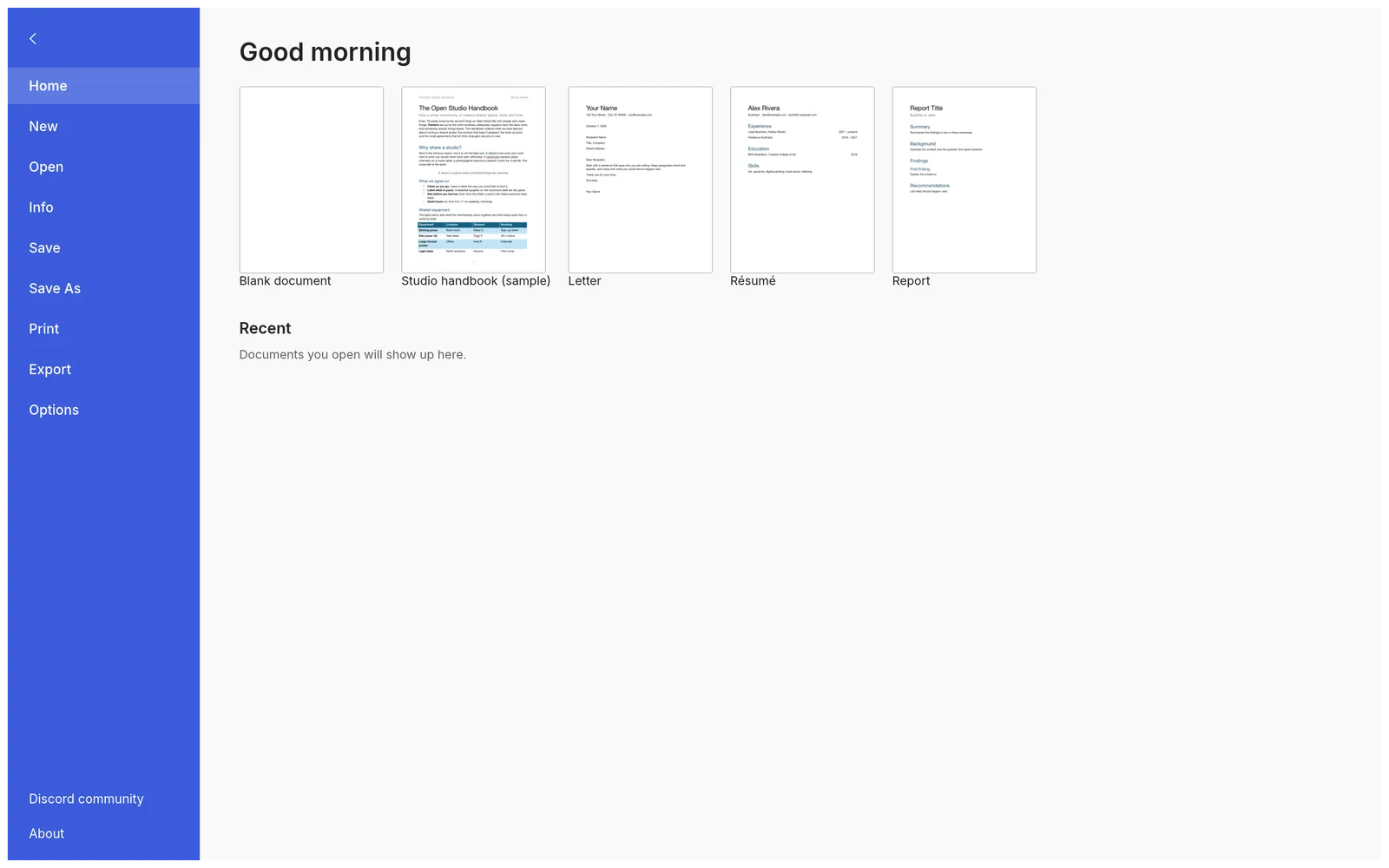
The File tab start page with thumbnails of the Blank document, Studio handbook, Letter, Résumé and Report templates

Templates and every common format

Start from a blank page, a letter, a résumé or a report. WordCraft opens and saves .docx, also reads and writes .odt, .rtf, .html, Markdown, LaTeX and plain text, opens old Word 97-2003 .doc files, and exports PDF.

Screenshot from the WordCraft project
AI writing assistant · bring your own key

Proofread, rewrite or translate a document with the model you already pay for

Open the AI panel next to the editor, paste an OpenAI, Google Gemini or OpenRouter key, and work on the document you just saved: summarize it, proofread it, rewrite it in another tone, translate it, or draft something new. Open the result in WordCraft with one click.

Requests go from your browser to the provider. We never see your key, your document or the results, and we add no markup.

How the AI assistant works
  • ProofreadA table of fixes you can find and apply, in any language
  • Rewrite and translateThe whole document back, headings, lists and tables kept
  • Summarize, draft, askShort or section-by-section summaries, new text from a brief, answers from the document
This site

What wordcraft.run adds

The editor is the release web build, byte for byte. Around it we add a few things the bare build doesn’t have.

Always the latest release

Each new WordCraft release is checked against its published SHA-256 checksum and deployed here. You are on v0.5.0.

An AI assistant on your own key

Summaries, proofreading, rewrites, translations and drafts from OpenAI, Gemini or OpenRouter models, straight from the browser.

Saves that reach the assistant

File › Save downloads your .docx as usual, and its text is ready in the AI panel at the same moment.

Nothing to sign up for

No account, no watermark, no upload. Close the tab and nothing of yours is left on a server.

Getting started

Three steps

  1. Open the editor. The first visit downloads the app, 12 to 15 MB compressed; after that it opens from your browser’s cache.
  2. Open a document with File › Open, or drag it onto the page: .docx, .doc, .odt, .rtf, .html, .md, .tex or .txt. Or start from a template on the File tab.
  3. Save. File › Save (Ctrl/⌘+S) downloads it as a .docx. File › Export saves a PDF or another format.

WordCraft is in alpha. Expect rough edges, keep the original file, and save before closing the tab: the browser version has no autosave and doesn’t remember settings between visits. See opening a .docx without Word for the details.

FAQ

Questions

Is WordCraft Online free?

Yes. The word processor is free and open source, with no account, no watermark and no document limit set by us. The optional AI writing assistant uses your own AI provider key, so any AI usage is billed by your provider, not by us.

Are my documents uploaded anywhere?

No. WordCraft runs inside your browser with WebAssembly. Opening, editing and saving happen on your device: files open from your disk and save back as downloads. The only exception is the AI panel, which sends the document text you choose straight to the AI provider whose key you entered.

Will my .docx look the same as in Microsoft Word?

Usually close, not always identical. WordCraft is a clean-room reimplementation in alpha, and its developers say pagination still differs from Word’s in places and that .docx fidelity hasn’t yet been tested on a large set of real-world files. Charts and SmartArt are shown but can’t be edited. Keep the original of anything important.

Does it save my work automatically?

Not in the browser. A web page can’t write to your files, so AutoSave is off and File › Save (Ctrl/⌘+S) downloads the document as a .docx. The browser asks before you leave the page with unsaved changes. The desktop app has AutoSave.

Which fonts can I use?

The browser version has the fonts built into WordCraft: Source Serif 4, Source Sans 3, Inter and JetBrains Mono, plus faces for Japanese, Chinese and Arabic. It can’t use the fonts installed on your computer, so a document set in another font is shown in a similar built-in one. The desktop app uses your installed fonts.

Does it work in other languages?

The interface follows your browser’s language when WordCraft has it: English, Simplified and Traditional Chinese, Japanese, Spanish, Brazilian Portuguese, Ukrainian, Serbian (Cyrillic and Latin) and Estonian. Right-to-left text such as Arabic and Persian is supported in documents. The built-in spelling checker is English.

Which browsers work?

A current Chrome, Edge, Firefox or Safari on a desktop or laptop. WordCraft draws with WebGPU and falls back to WebGL2 on its own. It runs on tablets and phones, but the ribbon is built for a keyboard and a big screen.

Is it a replacement for Microsoft Word?

Not yet, and its developers say so. WordCraft is an independent open-source project in alpha. By their own estimate it covers 88% of Word’s ribbon features with commands and is about 60% of the way to replacing Word for real work. It is a good fit for writing, editing and reviewing everyday documents.
Open a document and start writing

Free, private, and already loaded on your next visit.

Open the editor